
In some cases we need to reset the iDRAC to fix the issue and CMC ( Chassis Management Controller ) allows to reset the iDRAC without re-booting the OS.
Login in to the CMC Chassis Managment Controller through RACADM using SSH and run the below command racadm getversion. It will list the server details.

Run the command racadm racreset –m < Choose the server to reset > .
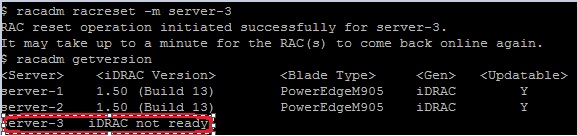
We can reset multiple iDRAC also by racadm racreset –m server-1 –m server-2 –f .
Reference : https://www.youtube.com/watch?v=bScMZJQQ5Oc

 Techbrainblog
Good info , thanks for posting…
LikeLike
Pingback: DELL chassis management controller website not functioning | Bits and Dragons