
vMotion Priority

I was looking to set the vMotion priority to make critical VMs like linux cluster VMs to move quicker than the other VMs ,tried the timeout value to max in linux OS level for cluster but still when the vMotion is taking extra timeout , one of the cluster node is considering the other node as down and it initiates the VM reboot,  which causes downtime for the application and to overcome that I found from the Brian Graf blog the below option called vMotion Priority ..

When a vMotion occurs, vCenter attempts to reserve the resources on both the source and destination hosts to be shared among all concurrent migrations. For vMotions set at High Priority, vCenter will give a greater share of host CPU resources over the Standard Priority vMotion. This is useful if there is a need to push a specific virtual machine through vMotion quicker than other VMs that are being vMotion at the same time.

vMotion Priority does not change the concurrent vMotion limits. The simultaneous vMotion limits can be seen below:

Operation       ESX\ESXi       Network Type      Max Cost

vMotion           3.x,4.0              1\10 Gig                 2

vMotion            4.1,5.x                1Gig                      4

vMotion             4.1,5.x               10Gig                   8

There are two values to choose from for the -vMotionPriority parameter

  • High – Increased CPU shares given for vMotion
  • Standard (Default) – No additional shares given

The –vMotionPriority parameter is added on to the Move-VM cmdlet as seen below.
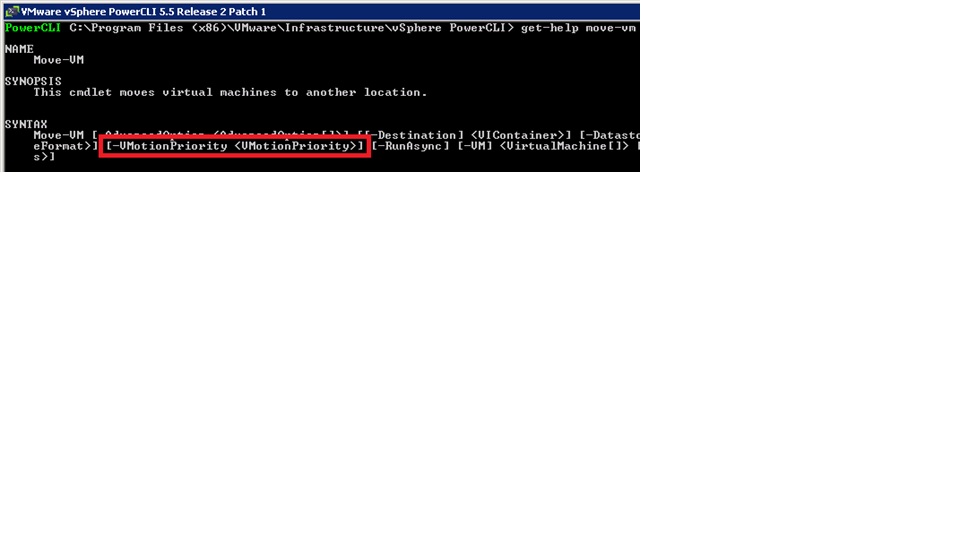
3

Move-VM –vm <VM Name> –vMotionPriority High –destination <destination host> -runasync

*Note: vMotion Priority is a benefit realized during concurrent vMotions.

Tested in my lab and the reference is from the Brian Graf blog .

Posted in PowerCLI, VMware | Tagged , , | Leave a comment

Vcenter Appliance configuration using SSH


  • Login to the console session of the VCSA
  • Execute the following command: /opt/vmware/share/vami/vami_config_net
  • Menu will appear to change the IP address, hostname, DNS, Default gateway and proxy server.
  • Execute the below command to ADD the VCSA to the AD Domain /opt/likewise/bin/domainjoin-cli join your.domain.local admin@your.domain.local

Reference: http://www.ivobeerens.nl/2013/01/14/allocate-a-static-ip-address-to-the-vmware-vcenter-server-appliance-vcsa/

Posted in Vcenter Appliance, VMware | Tagged , , | Leave a comment

vCenter Appliance DNS IP Entry Issue

Once OVF file is imported ,  I have configured the IP/Subnet/DNS/Firewall in the initial setup and left hostname as default and later by login to the webclient , configured the hostname and connected the VC to the AD domain , after rebooting the VC , found the AD name instead of DNS IP  in the DNS entry. Manually i modified the same with appropriate DNS ip and rebooted the appliance but still found the domain name on the DNS entry.

2

After searching to fix the issue found it is the bug in Vcenter appliance 5.1 and also in 5.5.

Help of the below KB article I deleted the VM and re-imported the OVF and configured again with the exact Hostname of the appliance with the IP,Subnet\DNS freshly during the initial stage of installation itself and rebooted the VC to check the entry and it fixed the issue..

1

http://kb.vmware.com/selfservice/microsites/search.do?language=en_US&cmd=displayKC&externalId=2065275

Posted in Vcenter Appliance, VMware | Tagged , , | Leave a comment