Powershell script to re-point\fail-over the VC to another replication Platform Service Controller ( PSC – VCSA 6.0)

Check my other blog for more information on re-pointing the VC to the external PSC , In this blog we can see by using the powershell script to re-point\failover the VC to another replication PSC.

We need cmsso-util to repoint PSC and pls check the  KB 2131191 for detailed information .

I believe currently there is no shell cmdlets from VMware to allow us to run shell commands directly using the powershell\powercli and while searching for any alternative, found the tool plink.exe which allows to run the command using the SSH . Pls refer the blog from Virtu-Al.Net for more info..

Idea of this code for plink.exe was taken from lucd and modified according to the requirement. pls check the help of plink.exe for more info.

To run this script download the plink.exe and provide the path of the same.

Download the script from the below location.

Git-Hub or DropBox

Also there is another script written by virtuallyGhetto to automate the same process which is very helpful to make the re-point operation to automate.


Reference:

http://www.lucd.info/

SSH PowerShell tricks with plink.exe

http://www.chiark.greenend.org.uk/~sgtatham/putty/download.html
http://www.virtuallyghetto.com/2015/12/how-to-automatically-repoint-failover-vcsa-to-another-replicated-platform-services-controller-psc.html

http://kb.vmware.com/selfservice/search.do?cmd=displayKC&docType=kc&docTypeID=DT_KB_1_1&externalId=2131191

https://blogs.vmware.com/vsphere/2015/10/reconfiguring-and-repointing-deployment-models-in-vcenter-server-6-0-update-1.html#comment-489138

Posted in F5 Load Balancer for PSC HA, High-Availability, Platform Services Controller (PSC ), Powershell, vCSA 6.0, VMware | Tagged , , , , | Leave a comment

Powershell script to find which platform service controller ( PSC ) is pointing to my vCenter appliance VCSA -6.0

We have two PSCs  which points to multiple VCs running in our environment and always   there will be a question that which PSC is pointing to which VC and there is easy way to find it using the web-client and also by vmafd-cli utility. Pls refer the blog from virtuallyghetto for more info and in this blog we can see by using the powershell script to check the same.

I believe currently there is no shell cmdlets from VMware to allow us to run shell commands directly using the powershell\powercli and while searching for any alternative, found the tool plink.exe which allows to run the command using the SSH . Pls refer the blog from Virtu-Al.Net for more info..

Idea of this code for plink.exe was taken from lucd and modified according to the requirement. pls check the help of plink.exe for more info.

To run this script download the plink.exe and provide the path of the same.

Download the script from the below location.

Git-hub or Dropbox


Reference :

http://www.virtuallyghetto.com/2015/09/which-platform-services-controller-psc-is-my-vcenter-server-pointing-to.html#comment-34308

http://www.lucd.info/

SSH PowerShell tricks with plink.exe

http://www.chiark.greenend.org.uk/~sgtatham/putty/download.html

Posted in Platform Services Controller (PSC ), PowerCLI, Powershell, Vcenter Appliance, vCSA 6.0, VMware | Tagged , , , | 1 Comment

Trend Micro Deep Security Manager 9.6 \ windows 10 support – part 2

Pls see my other blogs on Trend DSM 9.5 and 9.6 upgrade. Now we can see the recommendations and updates for windows 10.

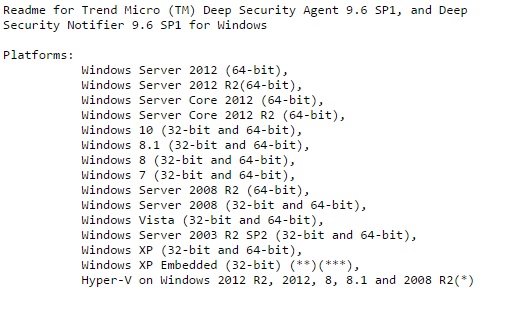
When Trend DSM 9.6 version was available for the download it was said that around NOV 2015 it will support the windows 10 version but it got delayed and Trend now officially announced that from new Trend 9.6 SP1  upgrade , the new agent it will support the windows 10.

We need to do the below two procedure in order to protect windows 10 using trend agent.

  1. Upgrade your Deep Security Manager to v9.6.  This will allow support of Windows 10 and still allow management of your current Deep Security v9.5 Agent/Agentless environment and most important is update the DSM 9.6 SP1.

2.       Install Deep Security v9.6 Agents to Windows 10 systems

http://docs.trendmicro.com/all/ent/ds/v9.6_sp1/en-us/DS_Agent-Windows_9.6_SP1_readme.txt

dw

Also note for agentless support is not available at this time as VMWare has not released an updated ESPEC (VMWare tools) support for Windows 10.  As per the information from VMWare  the support for this is targeted for first half of 2016.  However, it is unclear if this will be for NSX only or if it will include vCNS as well.

So for windows 10 in VMware environment, we have to go with agent-based protection which is a big set back for Anti-Malware products and also for the customers using agnet-less protection in their VDI environment.

Download link for the windows 10 agent.

http://downloadcenter.trendmicro.com/index.php?regs=NABU&clk=latest&clkval=4857&lang_loc=1

Note : Tested with just Trend 9.6 without SP1 for the windows 10 with old agent , it worked for me  but it is recommend to go with Trend 9.6 SP1.

Next blog we can see the steps to upgrade the SP1 in which we need to follow some important steps.

Posted in Trend Deep Security Manager - ( DSM ), Trend Micro Deep Security, Trend Micro Deep Security 9.5 ( VDI Environment-Agentless Protection ) | Tagged , , , , | 2 Comments

Powershell script to find the ilo details of the blade running on HP Enclosure.

By using the below powershell script we can find the ilo name and its ip of the blade running in the HP Enclosure.

We need HP Powershell cmdlet to run this script and download the same from the below link.

http://www8.hp.com/us/en/products/server-software/product-detail.html?oid=5440657#!tab=features

To find the HP ilo and its details , make sure to install the HPiLOCmdlets-x64.msi and look for the pdf for the installation steps.

Get-Help *hp* – It will show all the commands related to the HP

hod

To run this script we need Get-HPOAServerList cmdlet and we need to provide the HP Enclosure Name\IP.

Type ( get-help Get-HPOAServerList cmdlet -full ) for more examples.

Download the script from the below location.

Git-hub or Dropbox

Related links:

Related Links:

Powershell script to find the ilo firmware version of the blades running on the HP Enclosure.

Powershell script to find the HP valid Onboard Administrators list in the subnet.

Powershell Script to get the specified direct attached blade device serial number.

Powershell script to find the HP Enclosure information

Powershell script to find the current status of the specified HP Enclosure Fan

Powershell script to find the basic health and status of the HP Enclosure

Powershell to find the firmware version of the HP Enclosure Onboard Administrator and its related components.

Steps to upgrade the firmware of HP Virtual Connect Module using Virtual Connect Support Utility ( VCSU )

Posted in HP, Powershell | Tagged , , | 1 Comment

VMware vCenter Server Appliance 6.0 Update 1b installation issue – stuck at 70%

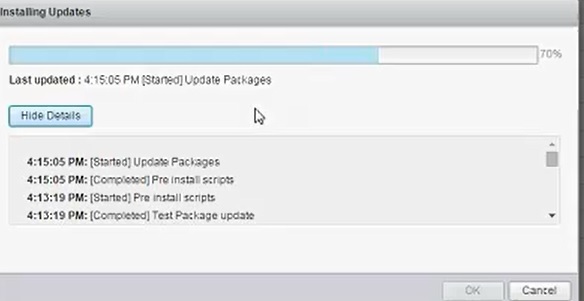
When we are installing the vCenter update using the web-client ( https://VCFQDN:5480 ) it got stuck at 70%.

update

We waited around 10 – 15 mins but nothing happened and finally rebooted the VC appliance and once it came up found that it got updated in the back end.

Later noticed it is mentioned in the Release-notes but when we try the same update using CLI in another VCSA it went successfully without any issue.

http://pubs.vmware.com/Release_Notes/en/vsphere/60/vsphere-vcenter-server-60u1b-release-notes.html#installupgrade

fwd

Posted in vCSA 6.0 | Tagged , , | Leave a comment

Powershell script to find the ilo firmware version with date

In this blog by using the powershell script we can find the firmware version of the ilo with the date.

We need HP Powershell cmdlet to run this script and download the same from the below link.

http://www8.hp.com/us/en/products/server-software/product-detail.html?oid=5440657#!tab=features

To find the HP ilo and its details , make sure to install the HPiLOCmdlets-x64.msi and look for the pdf for the installation steps.

Get-Help *hp* – It will show all the commands related to the HP

hod

To run this script we need We need Find-HPilo and get-HPiLoFirmwareversion cmdlet.

Type ( get-help Find-hpilo -full ) for more expamples

Download the script from the below location.

Git-hub or Dropbox.

Related Links:

Powershell script to find the ilo firmware version of the blades running on the HP Enclosure.

Powershell script to find the HP valid Onboard Administrators list in the subnet.

Powershell Script to get the specified direct attached blade device serial number.

Powershell script to find the HP Enclosure information

Powershell script to find the current status of the specified HP Enclosure Fan

Powershell script to find the basic health and status of the HP Enclosure

Powershell to find the firmware version of the HP Enclosure Onboard Administrator and its related components.

Steps to upgrade the firmware of HP Virtual Connect Module using Virtual Connect Support Utility ( VCSU )

Posted in HP, Powershell | Tagged , , , , | Leave a comment

Powershell script to find the valid iLOs in the subnet and also its firmware version

In this blog we can see by using the powershell script to find the vaild iLOs in the subnet and also its firmware version .

We need HP Powershell cmdlet to run this script and download the same from the below link.

http://www8.hp.com/us/en/products/server-software/product-detail.html?oid=5440657#!tab=features

To find the HP ilo and its details , make sure to install the HPiLOCmdlets-x64.msi and look for the pdf for the installation steps.

Get-Help *hp* – It will show all the commands related to the HP

hod

To run this script we need Find-HPilo cmdlet to lists valid iLOs in the subnet provided. You must provide the subnet in which the iLOs have to be searched.

Type ( get-help Find-hpilo -full ) for more expamples

Download the script from the below location.

Git-hub or Dropbox.

Related links:

Powershell script to find the ilo firmware version of the blades running on the HP Enclosure.

Powershell script to find the HP valid Onboard Administrators list in the subnet.

Powershell Script to get the specified direct attached blade device serial number.

Powershell script to find the HP Enclosure information

Powershell script to find the current status of the specified HP Enclosure Fan

Powershell script to find the basic health and status of the HP Enclosure

Powershell to find the firmware version of the HP Enclosure Onboard Administrator and its related components.

Steps to upgrade the firmware of HP Virtual Connect Module using Virtual Connect Support Utility ( VCSU )


Posted in HP, Powershell | Tagged , , , , | Leave a comment

Powershell script to find the ilo firmware version of the blades running on the HP Enclosure.

In this blog we can find the powershell script to find the firmware of ilo on the blades running on the HP Enclosure.

We need HP Powershell cmdlet to run this script and download the same from the below link.

http://www8.hp.com/us/en/products/server-software/product-detail.html?oid=5440657#!tab=features

Posted in HP, Powershell | Tagged , , , | 2 Comments

Powershell script to find the HP valid Onboard Administrators list in the subnet.

We can find HP valid Onboard Administrators list in the subnet by using the HP cmdlet Powershell script .

Download the HP cmdlet from the below link .

http://www8.hp.com/us/en/products/server-software/product-detail.html?oid=5440657#!tab=features

Install the HPOACmdlets-x64.msi and look for the pdf for the installation steps.

Get-Help *hp* – It will show all the commands related to the HP

hod

Get-Help *hpoa* – It will show all the commands related to the HP-onboard administrator.

The Find-HPOA cmdlet lists valid Onboard Administrators in the subnet provided. You must provide the subnet in which the Onboard Administrators have to be searched.

Download the script from the below location.

Git-hub or Dropbox.

Related links:

Powershell Script to get the specified direct attached blade device serial number

Powershell script to find the HP Enclosure information

Powershell script to find the current status of the specified HP Enclosure Fan

Powershell script to find the basic health and status of the HP Enclosure

Powershell to find the firmware version of the HP Enclosure Onboard Administrator and its related components.

Powershell to get the graph report of VMware VMs configured Memory.

Steps to upgrade the firmware of HP Virtual Connect Module using Virtual Connect Support Utility ( VCSU )


Posted in HP, Powershell | Tagged , , , | 2 Comments

Powershell Script to get the specified direct attached blade device serial number.

We can get the serial number of the blade server by using the HP cmdlet Powershell script .

Download the HP cmdlet from the below link .

http://www8.hp.com/us/en/products/server-software/product-detail.html?oid=5440657#!tab=features

Install the HPOACmdlets-x64.msi and look for the pdf for the installation steps.

Get-Help *hp* – It will show all the commands related to the HP

hod

Get-Help *hpoa* – It will show all the commands related to the HP-onboard administrator.

Get-HPOABladeDeviceSerialNumber cmdlet gets the specified direct attached blade device serial number and we need to provide the bay number.

Download the script from the below location.

Git-hub or Dropbox

Also by using the Find-HPiLO cmdlet , by providing the ilo ip’s of the blade we can get the serial number.

Git-hub or Dropbox.


Related links:

Powershell script to find the HP Enclosure information

Powershell script to find the current status of the specified HP Enclosure Fan

Powershell script to find the basic health and status of the HP Enclosure

Powershell to find the firmware version of the HP Enclosure Onboard Administrator and its related components.

Powershell to get the graph report of VMware VMs configured Memory.

Steps to upgrade the firmware of HP Virtual Connect Module using Virtual Connect Support Utility ( VCSU )

Posted in HP, Powershell | Tagged , , | 2 Comments